AI-Assisted Modeling
Introduction
Flowable Design (as of version 2025.2.02+) introduces AI-powered model interaction through a conversational user interface. When generative AI is enabled, a new option appears at the bottom of the property panel. This allows to build and modify models using natural language, using both text and voice input, rather than traditional drag-and-drop operations.
Supported Model Types
The AI assistant can work with:
- BPMN
- CMMN
- Agent
- Channel
- Data objects
- DMN
- Event
- Forms
- Services
- Data dictionary
Getting Started
- Enable generative AI in your Flowable Design settings
- Look for the AI interaction option at the bottom of the property panel
- Click to open the chat interface
- Describe what you want to create or modify using text or voice commands
 Experimental Feature
This feature is marked as experimental. Users may encounter issues, particularly when switching between different LLM models.
Recommendation: Use this as a technology preview for exploration and testing rather than production deployments. We will continue improving stability and capabilities in future releases as both the feature and underlying LLM technology mature.
Model Chat
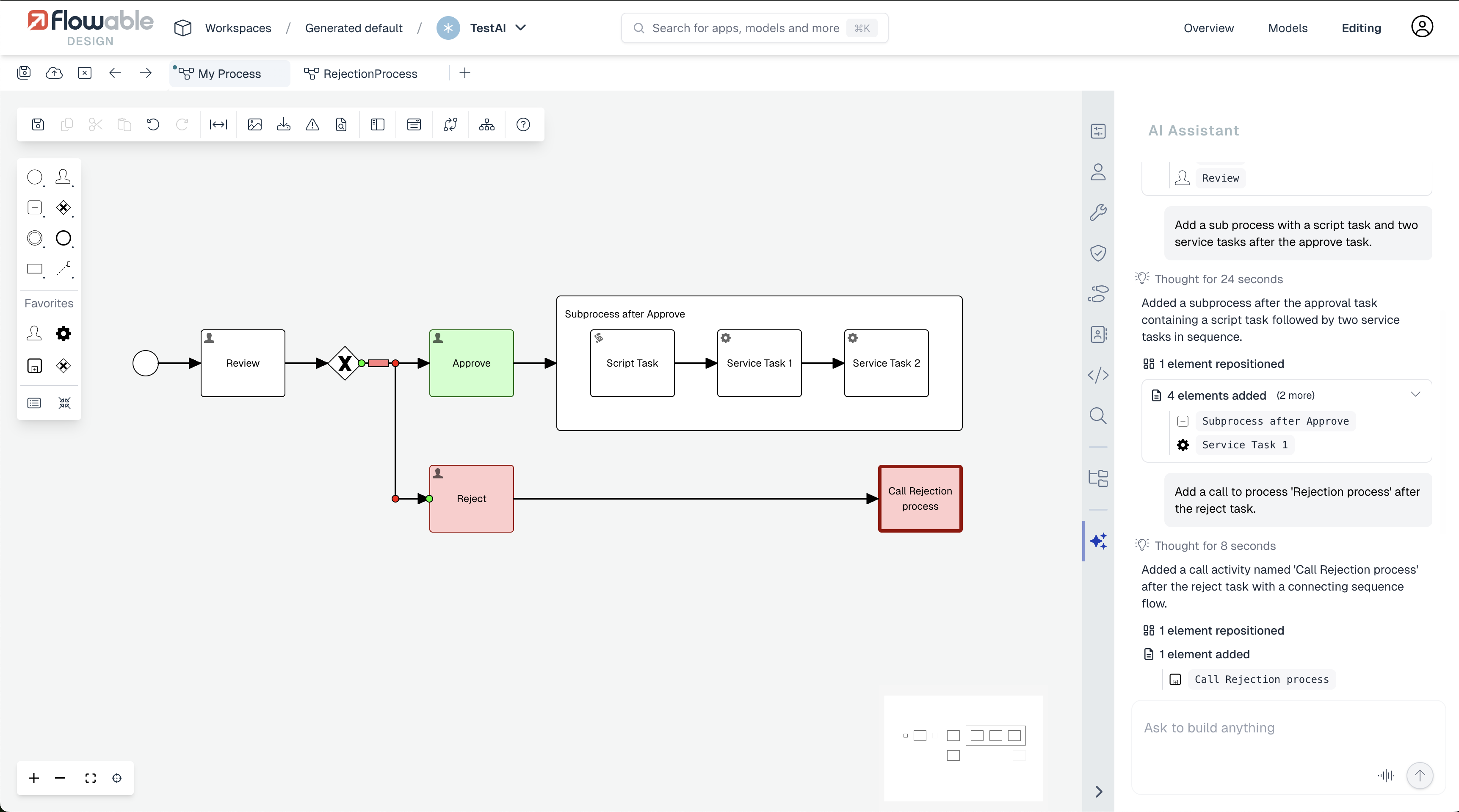
The chat in a support model allows to give direct instructions (e.g. add a subprocess with a script task) or more declarative commands (e.g. add a review and approval step, typical for the insurance industry).
The screenshot below shows how this looks like for BPMN:
Scripting Tasks
For BPMN and CMMN Script Tasks the AI chat functionality can be used to help with creating scripts. The AI button becomes visible in the top-right corner when hovering the script area, as shown here:
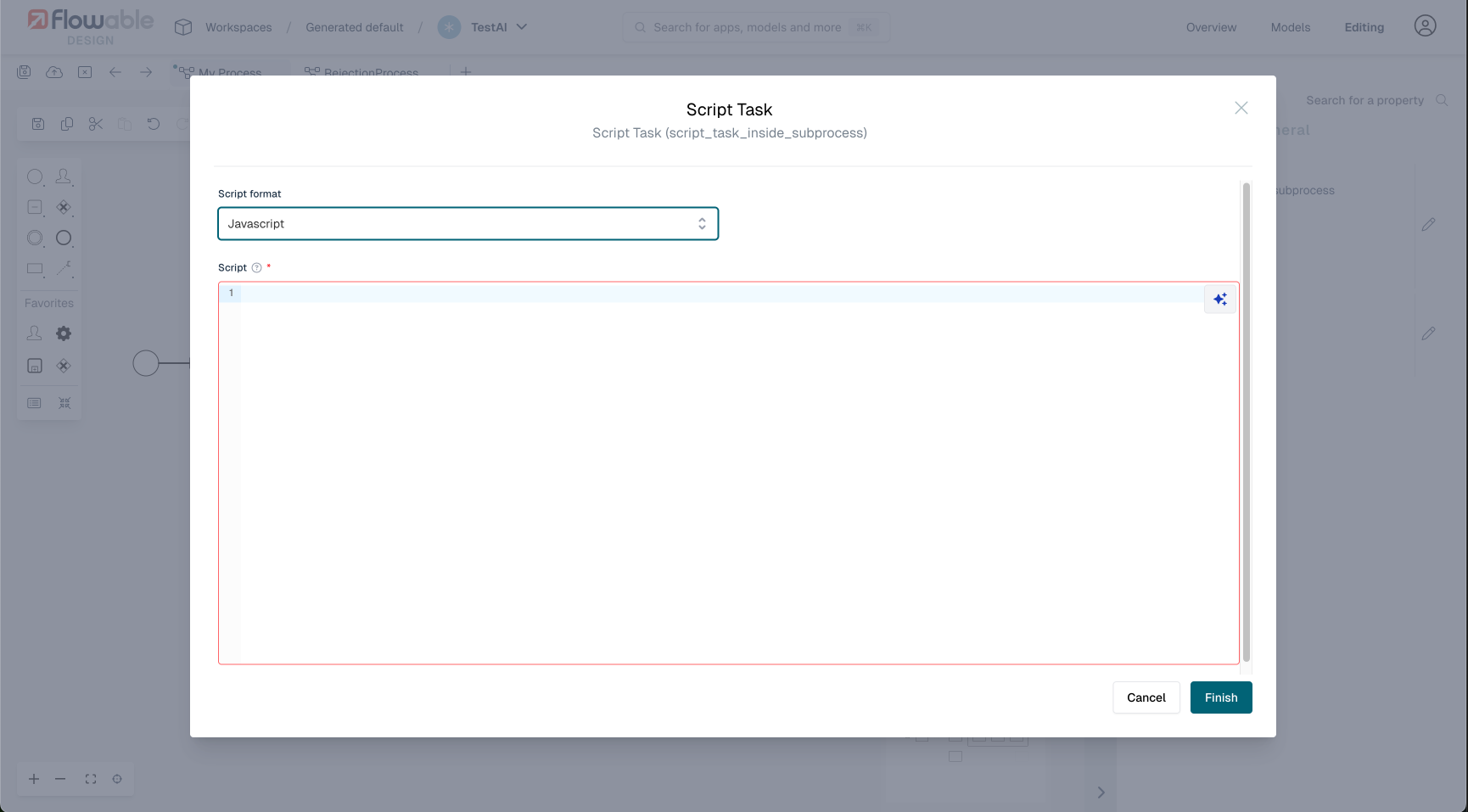
The chat interface uses a different paradigm here, where suggested changes need to be accepted. Note that the generated scripts will try to use the built-in flw functions to have script portability:

LLM Model Support
Supported LLM Providers and APIs
Flowable's AI-assisted modeling supports both OpenAI and Anthropic Claude as LLM providers. Both providers require support for structured output — the ability to constrain LLM responses to a specific JSON schema — which is essential for generating valid model definitions.
Prior to 2025.2.04+, only OpenAI models were supported for AI-assisted modeling. Starting with 2025.2.04+, Anthropic Claude models (such as claude-opus-4-6) are fully supported as well. Both OpenAI and Anthropic are used through the Responses API (see below).
What is the Responses API and how did we get here?
Historically, LLM providers each had their own API design. OpenAI's Chat Completions API (/v1/chat/completions) was the original standard: a stateless endpoint where the client sends the full conversation history with each request and receives a single assistant message in return. This was the API that Flowable initially integrated with.
In early 2025, OpenAI introduced the Responses API (/v1/responses) as the successor to Chat Completions. The Responses API brought several improvements: server-side conversation state (via previous_response_id, removing the need to resend the full history), richer built-in tool support (web search, file search, code interpreter), and more expressive streaming events. Crucially, OpenAI's newest and most capable model families — specifically the Codex models (e.g., gpt-5.2-codex) — are only accessible through the Responses API and do not work with the older Chat Completions API at all.
As the Responses API gained traction as the new industry standard, Anthropic adopted it as well for their Claude models. This means that both OpenAI and Anthropic now offer a common API surface, which is the Responses API. Flowable leverages this by using the Responses API as a unified integration point for both providers starting with 2025.2.04+.
For older Flowable versions (prior to 2025.2.04+), only the Chat Completions API is available, which limits usage to OpenAI models that support that API.
Both APIs support structured output (the ability to constrain LLM responses to a specific JSON schema), which is essential for Flowable's AI features where the LLM must produce valid model definitions.
What are Codex models?
OpenAI's Codex models (e.g., gpt-5.2-codex) are a specialized family within the GPT-5 generation that are purpose-built for code understanding and generation. Unlike general-purpose chat models (e.g., gpt-5, gpt-4o), Codex models have been specifically trained and optimized for:
- Code generation: Writing syntactically correct, logically sound code across many programming languages.
- Structured output adherence: Producing output that strictly follows JSON schemas — critical for Flowable's model generation where the LLM must produce valid BPMN/CMMN/DMN model definitions.
- Code reasoning: Understanding complex code structures, dependencies, and control flow.
- Instruction following for technical tasks: Better at following precise technical instructions about model structures and scripting conventions.
Because Flowable's AI features essentially require the LLM to generate structured data (model definitions are similar to code), these code-specialized models are a natural fit.
Model Recommendations
From 2025.2.04+: gpt-5.2-codex or claude-opus-4-6 (Recommended)
Starting with 2025.2.04+, Flowable supports the Responses API and Anthropic Claude models for AI-assisted modeling. We recommend gpt-5.2-codex (OpenAI) or claude-opus-4-6 (Anthropic) for both AI Chat (model generation and modification) and Script Task AI (script generation).
In our tests, both models gave superior results compared to all other models:
gpt-5.2-codex: A Codex model purpose-built for code generation. It treats model generation as a code task, producing highly accurate BPMN/CMMN/DMN definitions and reliable scripts that correctly use Flowable's built-inflwfunctions.claude-opus-4-6: Anthropic's most capable model. It delivers results comparable togpt-5.2-codexfor both model generation and script writing, making it an excellent alternative for teams that prefer Anthropic's models.
See the AI Setup documentation for configuration instructions for both providers.
All models comparison
In our experimentations, results varied significantly depending on the LLM model being used. Here are some of our results:
| Model | Results | Speed | Requires 2025.2.04+ |
|---|---|---|---|
| gpt-5.2-codex | +++++ | ++ | Yes |
| claude-opus-4-6 | +++++ | ++ | Yes |
| gpt-4.1-mini | ++++ | ++++ | No |
| gpt-4.1 | ++++ | +++ | No |
| gpt-4.1-nano | ++ | +++++ | No |
| gpt-4o | +++ | ++ | No |
| gpt-5 | ++ | + | No |
| gpt-5-1 | ++ | + | No |
| gpt-5-nano | ++ | ++++ | No |
| gpt-5-mini | ++ | ++++ | No |
gpt-5.2-codex and claude-opus-4-6 give the best results overall, but are slower than some of the lighter models. They require 2025.2.04+ and the Responses API (see AI Setup).
For versions prior to 2025.2.04+, gpt-4.1-mini gives the best results balanced with acceptable speed (however your tests might of course yield different results).