Manual Task
Introduction

 info
infoA Manual Task is a Task that is expected to be performed without the aid of any business process execution engine or any application. An example of this could be a telephone technician installing a telephone at a customer location.
— BPMN 2.0.2 Standard, 10.3.3, Manual Task
In Flowable, Manual Tasks have no execution semantics. They are usually used for documentation purposes only. However, it is possible to place execution listeners on them as with any other activity.
An action for a user of the Flowable Work application can be modeled with the User Task.
Example
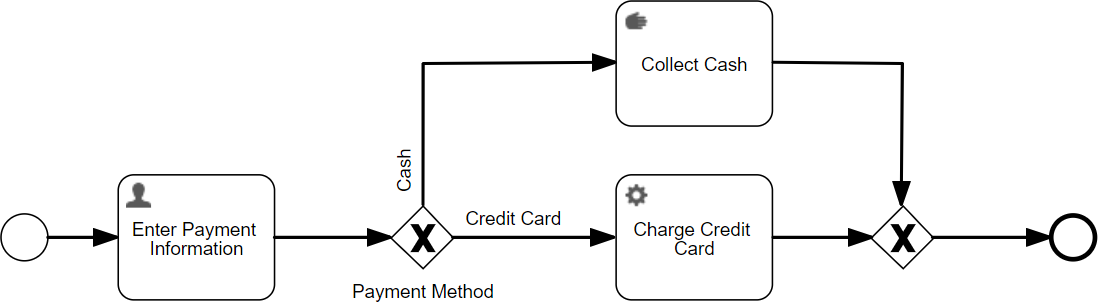
The following example shows how a Manual Task which is non-executable (Collect Cash) is used to clarify a model.
Properties
General
| Attribute | Type | Description | Category |
|---|---|---|---|
| Model Id | Text | Model Id identifies the element within the process model. | The model id, name and documentation properties can be found on any element. They are used respectively to uniquely identify the manual task, to give it a user-friendly name and to add a free-form description. |
| Name | Text | The name of the element. This is the name displayed in the diagram. | |
| Documentation | MarkdownMinimal | A free-form text that can be used to explain details about the particular element. |
Multi Instance
Multi instance
| Attribute | Type | Description | Category |
|---|---|---|---|
| Multi instance type | Selection:
| The type of multi-instance: default is 'None' meaning a single instance is created at runtime. Select either 'Parallel' or 'Sequential' if you want multiple instances to be created. | Multi-instance is used to define the repetition of this manual task at runtime. With multi-instance it is possible to have multiple passthroughs of this manual task in the process instance, either sequentially after each other or in parallel. |
| Collection | Text | References a collection variable (for example a JSON array variable) by its name or using an expression that resolves to a collection. | |
| Element variable | Text | The name of the variable where the currently processed element from the multi-instance collection configured above will be stored (for example, 'invoicePosition'). The element can then be accessed through an expression, e.g., ${invoicePosition}. | |
| Element index variable | Text | The name of the variable where the index of the currently processed item from the multi-instance collection will be stored, for example, 'itemIndex'. The index is a number starting with 0 which is increased with every element that is being created. The index can then be accessed through an expression, e.g., ${itemIndex} further on in the process. | |
| Cardinality | Text | A fixed number or an expression that resolved to an integer that controls the number of instances that will be created. This is typically used when there is no collection available or needed. | |
| Completion condition | Text | An expression that should resolve to a boolean value. When evaluating to true, the remaining activity instances will be removed and the process instance will continue. |
Variable aggregation
| Attribute | Type | Description | Category |
|---|---|---|---|
| Variable Aggregations | List | Define an aggregation. Each element in this list will result in one aggregation variable. | When using multi-instance, there is often a need to create an aggregation of the variables created and/or updated in each instance. The use cases for using it on a manual task are limited, as typical no new variables are produced during the execution of the task. |
Advanced
| Attribute | Type | Description | Category |
|---|---|---|---|
| Optimize for only automatic steps | Boolean | (Advanced setting, only check it if you understand the implications) If checked, this instructs the Flowable engine that the multi-instance only contains automatic tasks and no wait states. In this situation, an asynchronous job is created when the multi-instance activity is entered that keeps checking if all instances are completed and completes the multi-instance. The benefit of this approach is that it is light on resources versus alternatives and doesn't lead to optimistic locking exceptions. |
Advanced
Execution
| Attribute | Type | Description | Category |
|---|---|---|---|
| Skip expression | Text | If the Skip expression evaluates to true, the flow is taken regardless of any condition. It is required to opt-in to this feature by setting a variable _FLOWABLE_SKIP_EXPRESSION_ENABLED with the Boolean value true on the process instance. | When the Skip expression resolves to true, this manual task will not be executed at runtime. The Include in history flag can be used to store the historical entry of this manual task when running with a history level that normally would not store the execution of the manual task. Note that this flag has no effect when running with history level 'none'. |
| Include in history | Boolean | When the history level is set to "instance" or "task" level with this property it can be configured if this activity instance should be included in the historic activity data. | |
| Is for compensation | Boolean | Determines whether the activity can serve as a compensation for another activity. | A BPMN transaction is a set of activities that logically belongs together. Transactions can be cancelled through the Cancel End Event and handled through the Cancel Intermediate Boundary Event. The Is for compensation field can be used to indicate that the manual task is meant as compensation steps for another activity. |
| Asynchronous | Boolean | When enabled, the activity will be started as an asynchronous job. The process state is persisted before this element is executed. Then, the process execution will be resumed asynchroneously. This can be used when the execution an activity takes a long time to return the UI to the user quicker in case the user does not need to see the next step immediately. However, if an error occurs before the following wait state, there will be no direct user feedback. Please refer to the documentation for more details. | When making a manual task asynchronous, the pass-through will be done asynchronously in the background. This typically has no use case, except if there's heavy logic in for example an attached execution listener. Choose exclusive to avoid other asynchronous steps of this process instance to run at the same time. When Leave asynchronously is enabled, the activity will be left as an asynchronous job. This means that the activity is ended asynchronously. |
| Exclusive | Boolean | Determines whether the activity or process is run as an exclusive job. An exclusive job makes sure that no other asynchronous exclusive activities within the same process are performed at the same time. This helps to prevent failing jobs in concurrent scenarios. | |
| Leave asynchronously | Boolean | When enabled, the activity will be left as an asynchronous job. This means that the activity is ended asynchronously, including end execution listeners. Please refer to the documentation for more details. | |
| Leave exclusive | Boolean | Determines whether the activity should leave as an exclusive job. An exclusive job makes sure that no other asynchronous exclusive activities within the same process are performed at the same time. This helps to prevent failing jobs in concurrent scenarios. | |
| Job Category | Text | When set, the underlying generated job will have a Job Category, which will be executed only by Application Servers, where the Process Engine has enabledJobCategories set to this category. |
Listeners
| Attribute | Type | Description | Category |
|---|---|---|---|
| Execution listeners | List | Allows invoking custom after certain lifecycle events. Start: Executes after the activity has been started. End: Executes after the activity was completed. Transition: When defined on a sequence flow, executes once the flow is transition is taken. | Execution listeners are used to add logic on certain lifecycle events. Typically it is used to add extra technical logic which shouldn't be visible in the BPMN process model. |
Visual
| Attribute | Type | Description | Category |
|---|---|---|---|
| Font size | Selection:
| Font size. | Visual properties that determine how the manual task is shown in the diagram. This has no impact on the runtime execution. |
| Font weight | Selection:
| Select the style between bold and normal. | |
| Font style | Selection:
| Select the style between italic and normal. | |
| Font color | Color | Select a font color. | |
| Background color | Color | The background color of the element in the diagram. | |
| Border color | Color | The border color of the element in the diagram. |
List Attribute Details
Variable Aggregations
| Attribute | Type | Description |
|---|---|---|
| Target (Variable / Expression) | Text | The name of the target variable or an expression that gives the variable name |
| Type | Selection:
| The type of aggregation. Use 'default' to use the standard behavior of creating an aggregation JSON variable. Use 'custom' to define a delegate expression that will handle the aggregation. Please see the documentation for more information. |
| Delegate Expression | Text | Define a delegateExpression that will resolve to an instance of VariableAggregator (for BPMN) or PlanItemVariableAggregator (for CMMN). This instance will then be responsible for aggregating the variables. |
| Class | String | A class that implements VariableAggregator (for BPMN) or PlanItemVariableAggregator (for CMMN). This instance will then be responsible for aggregating the variables. |
| Target variable creation | Selection:
| Configures the way the aggregation variable is created. The 'Default' option creates the aggregation variable when all instances of the multi-instance have been completed. Use 'Create overview variable' to create a variable at the start of the multi-instance and keep it up to date during multi-instance exeution. Once all the instances are completed it will create a JSON variable in the same way as for Default target variable creation. Use the 'Store as transient variable' option to have the default behavior, but store the resulting aggregation variable transiently. |
| Variable Definitions | BasicFormList | property.loopVariableAggregation.definitions.description |
Variable Definitions
| Attribute | Type | Description |
|---|---|---|
| Source (Variable / Expression) | Text | The name of the source variable or an expression that provides the value |
| Target (Variable / Expression) | Text | The name of the aggregation variable or an expression that resolves to a variable name. |
Execution listeners
| Attribute | Type | Description |
|---|---|---|
| Event | Selection:
| The lifecycle event. The 'Take' event is only available for sequence flow. |
| Class | Text | Fully qualified classname of a class to be invoked when executing the task. The class must implement either JavaDelegate or ActivityBehavior. |
| Expression | Text | JUEL Expression to be executed when the task is started. Expressions allow you to interact with the backend by calling services, making calculations etc. You can find more information about expressions in the documentation. |
| Delegate expression | Text | Delegate Expression to be executed when the task is started. A delegate expression must resolve to a Java object, for instance a Spring bean. The object's class must implement either JavaDelegate or ActivityBehavior. |
| Fields | List |
Fields
| Attribute | Type | Description |
|---|---|---|
| Name | Text | The name of the element. This is the name displayed in the diagram. |
| String value | Text | |
| Expression | Text | JUEL Expression to be executed when the task is started. Expressions allow you to interact with the backend by calling services, making calculations etc. You can find more information about expressions in the documentation. |
| String | Text |